
Best overall for GitHub-based businesses: GitHub Actions. Best for a unified delivery platform: GitLab CI/CD. Best for established Microsoft workflows: Azure Pipelines. This buyer’s guide compares the best CI/CD tools for DevOps teams by release control, operational responsibility, and fit with your existing software delivery process—not by feature count.
TL;DR
- GitHub Actions leads this shortlist of best ci/cd tools for devops teams already using GitHub.
- GitLab CI/CD suits businesses consolidating source control and software delivery in one platform.
- Jenkins supports custom infrastructure but requires an accountable maintenance owner.
- Syndell is a custom software development partner, not a CI/CD software vendor.
Why this matters
A CI/CD decision is a business operating decision. Continuous integration checks changes before they reach customers; continuous delivery prepares tested changes for release. Continuous deployment goes further by releasing qualifying changes automatically.
Start with your release problem: delayed approvals, unreliable tests, manual deployments, or unclear ownership. Buying a different tool doesn't resolve an undefined release process. If you're evaluating implementation support, DevOps services for scaling SaaS products belongs in the same conversation as tool selection.
Syndell is a custom software development partner for businesses building digital products and hiring dedicated development teams. Evaluate that service separately from the CI/CD platform: the tool runs workflows, while your internal team or contracted partner remains responsible for their design and operation.
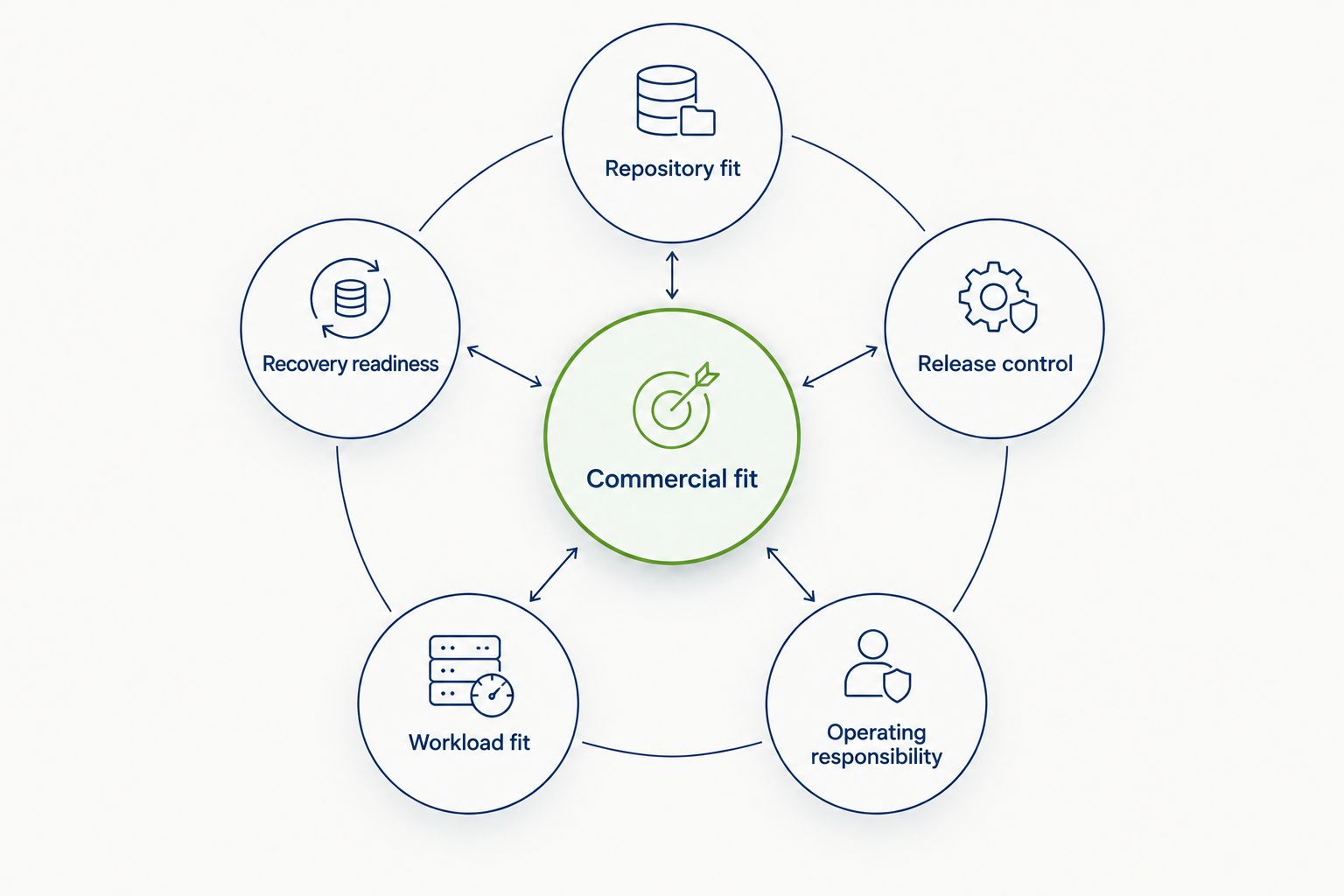
What makes the best CI/CD tools for DevOps teams?
Use these criteria before requesting a demonstration or approving a migration:
- Repository fit: Prefer a platform that works naturally with your existing source control. Moving repositories creates a separate migration project.
- Release control: Check who can authorize production changes, how credentials are handled, and what evidence remains after deployment.
- Operating responsibility: Decide who maintains build infrastructure, workflow definitions, integrations, and incident procedures.
- Workload fit: Evaluate your actual application, including private dependencies, mobile builds, containers, and network access requirements.
- Recovery readiness: Require a tested recovery process. A successful build is not proof that a failed release can be reversed.
- Commercial fit: Compare contractual terms, support, administration, and ongoing infrastructure commitments without treating the subscription as the entire decision.
Separate platform capabilities from configured controls. A tool supporting approvals does not mean your production workflow requires approval; a logging feature does not establish your organization's retention policy.
CI/CD tools at a glance
Each platform below has a distinct buying situation. The ranking is a decision tree, not a claim that one product outperforms every alternative.
| Tool | Best for | Standout feature | Key limitation |
|---|---|---|---|
| GitHub Actions | Businesses already managing code in GitHub | Workflows connected to repository events | Workflow and runner governance still need ownership |
| GitLab CI/CD | Businesses consolidating their delivery platform | Pipelines integrated with GitLab repositories | Consolidation requires platform-wide process decisions |
| Azure Pipelines | Businesses operating within Azure DevOps | Integration with Azure DevOps delivery workflows | Existing Microsoft relationships do not guarantee application fit |
| CircleCI | Businesses seeking a separate managed CI platform | Managed pipeline execution and reusable configuration | Adds another platform to administer |
| Jenkins | Businesses requiring extensive custom build infrastructure | Extensible, self-managed automation | Plugin, server, and security maintenance remain your responsibility |
| Argo CD | Businesses deploying applications to Kubernetes | GitOps-based desired-state reconciliation | Handles delivery, not the complete build-and-test process |
The comparison is especially useful when a development partner proposes changing platforms. Ask which limitation disappears, which new responsibility appears, and who owns that responsibility after handover.
1. GitHub Actions: best CI/CD tool for GitHub-based businesses
GitHub Actions automates workflows triggered by repository events or other configured conditions. It supports build, test, and deployment workflows using GitHub-hosted or self-hosted runners. For businesses already working in GitHub, it keeps automation close to code review.
GitHub Actions pros:
- Connects workflow execution with pull requests and repository changes.
- Supports reusable workflows for shared delivery practices.
- Offers hosted and self-hosted execution choices.
GitHub Actions cons:
- Third-party actions require dependency and permission review.
- Self-hosted runners introduce infrastructure and security responsibilities.
- Separate application workflows can drift without shared standards.
Best for: Businesses keeping their repositories in GitHub and wanting delivery automation in the same working environment.
Before choosing GitHub Actions, ask your partner to demonstrate production authorization, secret access, and runner isolation for your application. Approval and security features must be checked against the proposed account configuration and applicable product terms.
Verdict: Buy into GitHub Actions when GitHub is your established repository platform and workflow governance has an assigned owner.
2. GitLab CI/CD: best CI/CD tool for platform consolidation
GitLab CI/CD defines and executes pipelines within GitLab's source-control environment. GitLab runners perform the jobs, with execution infrastructure selected for your deployment model. The business case is reducing the separation between repository management and delivery coordination.
GitLab CI/CD pros:
- Keeps pipeline configuration alongside application code.
- Connects delivery execution with GitLab's repository workflows.
- Supports runner arrangements suited to different infrastructure requirements.
GitLab CI/CD cons:
- Repository migration expands the scope of a consolidation project.
- Self-managed infrastructure requires ongoing operational work.
- Governance capabilities must be verified for the proposed offering.
Best for: Businesses making a deliberate decision to standardize repository management and delivery around GitLab.
Ask for a migration boundary before approving consolidation. Repositories, permissions, integrations, and historical delivery evidence are separate concerns; combining them into an undefined implementation package makes acceptance difficult.
Verdict: Buy into GitLab CI/CD for planned platform consolidation; hold if the proposal changes repositories without a clear business reason.
3. Azure Pipelines: best CI/CD tool for Azure DevOps organizations
Azure Pipelines provides build and release automation within Azure DevOps. It supports hosted and self-hosted agents and integrates with the surrounding Azure DevOps workflow. Its strongest buying context is an organization already coordinating software delivery there.
Azure Pipelines pros:
- Fits existing Azure DevOps project structures.
- Supports multiple operating systems and application stacks.
- Offers hosted and self-hosted agent choices.
Azure Pipelines cons:
- Agent management adds work when private infrastructure is required.
- Enterprise identity alignment does not replace workflow design.
- External integrations still require access and credential review.
Best for: Organizations whose delivery process already depends on Azure DevOps.
In a procurement review, distinguish cloud hosting from delivery-platform fit. Running an application on Azure does not automatically make Azure Pipelines the right choice; repository practices, approvals, and the operating team's experience still matter.
Verdict: Buy into Azure Pipelines when Azure DevOps is already central to delivery; hold if cloud hosting is the only justification.
4. CircleCI: best CI/CD tool for separate managed execution
CircleCI provides a CI/CD platform with managed execution and configuration-defined pipelines. It supports reusable configuration through features such as orbs. The buyer's question is whether a dedicated automation platform improves the delivery arrangement enough to justify another system.
CircleCI pros:
- Separates managed pipeline execution from repository hosting.
- Supports reusable configuration for recurring pipeline tasks.
- Provides execution options for different build requirements.
CircleCI cons:
- Adds another platform for access control and administration.
- Reusable integrations require security and maintenance review.
- Pipeline portability still needs evaluation before migration.
Best for: Businesses deliberately selecting managed CI independently of their repository platform.
Request an application-specific demonstration rather than a generic build. Private dependencies, test artifacts, and deployment credentials reveal integration work that a simple sample project leaves out.
Verdict: Buy into CircleCI when separate managed execution solves a documented requirement; skip adding it solely because it is another option.
5. Jenkins: best CI/CD tool for custom infrastructure control
Jenkins is an open-source automation server with an extensive plugin ecosystem. Businesses operate the server and its execution infrastructure themselves or assign that work to a partner. Jenkins suits customized delivery environments, but customization creates a continuing maintenance obligation.
Jenkins pros:
- Supports extensive integrations through plugins.
- Allows direct control over execution infrastructure.
- Accommodates customized build and deployment workflows.
Jenkins cons:
- Server updates, plugin compatibility, and security need active ownership.
- Highly customized pipelines complicate handover.
- Operational responsibility continues after initial implementation.
Best for: Businesses with specific infrastructure requirements and a team accountable for maintaining automation.
Ask for an inventory of plugins, credentials, agents, and maintenance tasks. If the proposal names implementation deliverables but omits recurring administration, it leaves part of the operating model unresolved.
Verdict: Buy into Jenkins when custom control is necessary and maintenance is funded; skip it when nobody owns the platform.
6. Argo CD: best delivery tool for Kubernetes GitOps
Argo CD is a declarative GitOps continuous delivery tool for Kubernetes. It compares deployed application state with the desired state recorded in Git and supports synchronization. It belongs in this shortlist as a delivery component, not as a replacement for build and test automation.
Argo CD pros:
- Makes desired application state explicit in Git.
- Shows differences between desired and deployed state.
- Supports a Kubernetes-focused delivery operating model.
Argo CD cons:
- Requires Kubernetes and GitOps operating knowledge.
- Needs complementary CI for builds and tests.
- Synchronization alone does not solve database recovery.
Best for: Businesses already deploying to Kubernetes and adopting GitOps for application delivery.
Identify the boundary between artifact creation and deployment before hiring an implementation partner. Your CI system produces and checks the artifact; Argo CD manages the deployment state described in Git.
Verdict: Buy into Argo CD for a defined Kubernetes delivery requirement; skip it as a standalone CI replacement.
How the ranking works
This shortlist prioritizes repository fit, release control, operating responsibility, workload fit, recovery readiness, and commercial fit. It does not present performance-test results or declare a universal speed winner.
The highest-ranked applicable option is the starting point—not the automatic purchase. A documented requirement for private execution, Kubernetes delivery, or self-managed infrastructure changes the appropriate choice.
What to require from an implementation partner
Ask Syndell or another custom software development partner to separate platform selection from delivery-process acceptance. The proposal should explain what gets automated, who retains control, and what your team receives at handover.
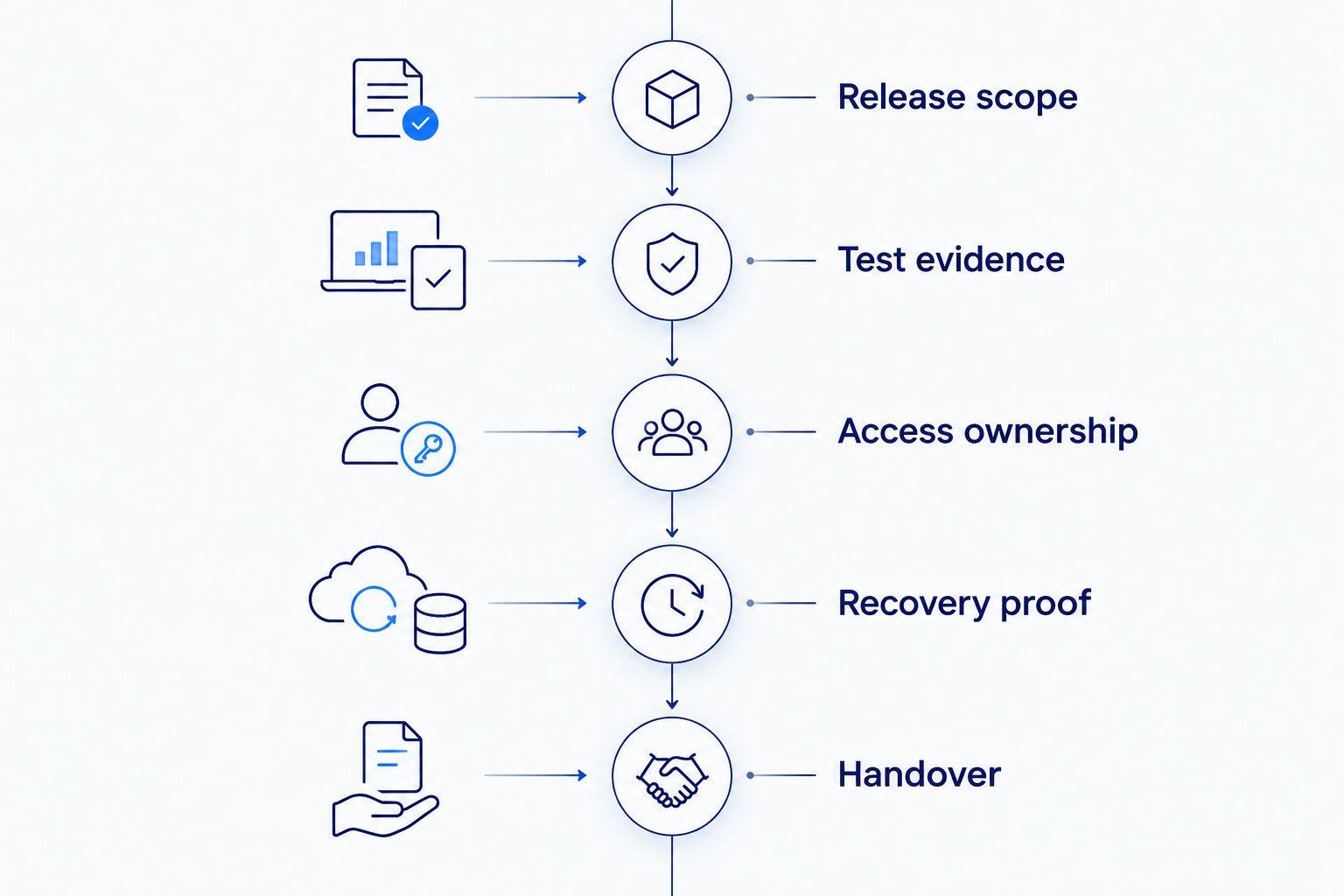
Use 3 environments—development, staging, and production—as a starting review structure, adjusting it to your application's actual needs. Require 2 release scenarios: a successful deployment and a failed deployment with recovery. Assign 1 accountable owner for ongoing pipeline operation; these are recommended acceptance checks, not industry benchmarks.
- Release scope: Define which application components and dependencies are included.
- Test evidence: Specify which failed checks stop promotion and where results are recorded.
- Access ownership: Keep repository, infrastructure, and deployment access under business-controlled accounts.
- Recovery proof: Demonstrate application recovery and address database changes separately.
- Handover: Require documentation, operating responsibilities, and an escalation path.
If test reliability is the release bottleneck, evaluate QA automation testing services for SaaS products alongside pipeline work. Moving unreliable tests into a newer CI/CD tool does not make the release decision trustworthy.
Compare your own baseline with the proposed workflow: build duration in minutes, recovery duration in minutes, and the proportion of releases needing corrective action. Define measurement boundaries before collecting results. Do not accept a speed claim that excludes waiting, approvals, or failed runs.
Which CI/CD tool should you choose?
Choose GitHub Actions by default if your business already uses GitHub and has no requirement that rules it out. Choose GitLab CI/CD for deliberate platform consolidation, Azure Pipelines for established Azure DevOps operations, or CircleCI for a separate managed CI requirement.
Jenkins requires an explicit maintenance commitment. Argo CD belongs in a Kubernetes delivery architecture alongside CI. Avoid migrating a functioning platform until you can name the release problem the migration solves.
Define your delivery requirements
Discuss your custom software project, release responsibilities, and development team needs.
Talk to Syndell
One last thing
A successful application rollback does not prove that a database change is reversible. Ask your proposed implementation partner to demonstrate recovery after a release that changes stored data. That acceptance check tells you more about release readiness than a dashboard showing successful builds.