!– wp:paragraph –>
If you already use an ERP system and want to increase your ability to forecast sales, you’ve come to the correct location. Your ERP system can be improved by integrating OpenAI with web apps to speed up company processes and increase the accuracy of sales forecasts.
More than 3 million individuals are already using DALLE – OpenAI API to speed up their workflows, said OpenAI. If you’re interested in understanding how to benefit from this potential by easily integrating OpenAI with your ERP system, keep reading.
As a leading AI development company or ReactJS app development company in the USA, UK, and CA, we possess extensive knowledge of incorporating OpenAI into ERP systems. We’ve created this thorough manual for you by hiring ReactJS developers or hiring AI ML developers, and building an ERP system using OpenAI through research and collaboration with our skilled React Web app developers.
Now, let’s get started!
Interested in integrating OpenAI into your ERP system?
Share your needs, and let’s work together to develop a robust, scalable ERP solution with top-notch code quality.
/figure>
Steps to Integrating OpenAI with Your ERP System for React Web App
/figure>
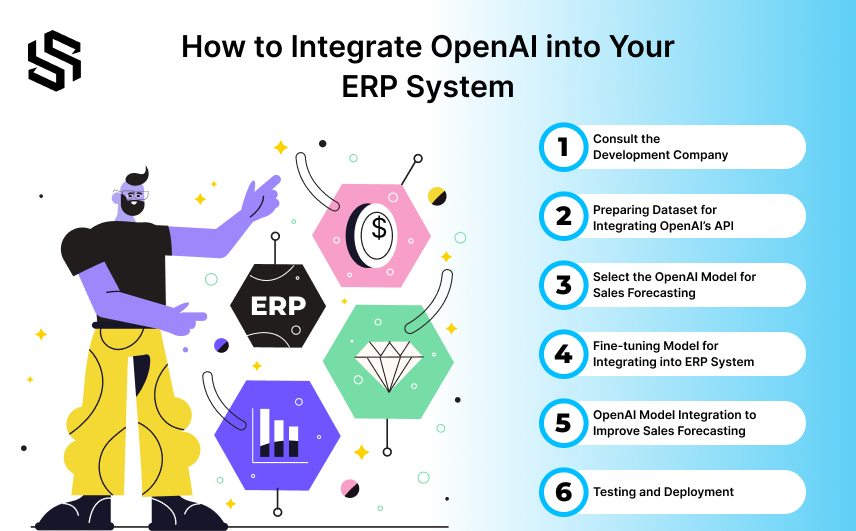
Integrating OpenAI with your ERP system involves several steps to ensure seamless and effective integration. Here’s a step-by-step guide on how to do it.
To ensure a seamless and effective integration, there are various procedures to take when integrating OpenAI with your ERP system.
Step 1: Consult the ReactJS Development Company OR AI Development Company
When you’re considering integrating OpenAI into a React Web app to improve Your ERP system, it’s essential to engage with a top-notch software development company.
During your search for the ERP system development company, here are the key steps to follow:
- Discuss the integration requirements, including the data to be used and the desired output.
- Research and compare different ERP system development companies.
- Choose a company with extensive experience in integrating OpenAI with ERP systems and a successful track record in delivering sales forecasting solutions.
- Ensure the company has the necessary resources, including technical expertise, project management skills, and data scientists.
- Review case studies of similar projects they’ve completed to assess the quality of their work.
- Consider their communication and collaboration skills, which are crucial for a successful outcome.
- Schedule a meeting to discuss integration details, ask questions, and confirm expertise and resources.
- Review the proposal provided by the development company, ensuring it covers all requirements, is within budget, and provides a delivery timeline.
- Establish clear expectations by negotiating the contract’s terms, such as the work’s scope, deadline, and payment schedule.
Once you’ve selected the right ReactJS development company or AI ML Development Company to integrate the ERP System, they will proceed to clean and preprocess the data, making it suitable for analysis.
Step 2: Preparing Dataset for Integrating OpenAI’s API
The success of OpenAI’s forecasting model depends on the availability of high-quality data.Data preparation ensures that OpenAI has access to relevant, accurate data, essential for precise sales forecasting predictions. Properly prepared data can lead to reduced error rates, informed decision-making, and a positive return on investment.
Here are the key steps advanced ReactJS Web App developers follow in data preparation:
- Gather data from various sources, including the ERP system, internal databases, and external sources, to create a complete and accurate dataset.
- Remove irrelevant, incomplete, or duplicate data and ensure data consistency.
- Transform data into a format compatible with OpenAI, such as numerical or time series data.
- Create new features from the data, like identifying trends and seasonality, to enhance forecasting accuracy.
- Split the data into training and testing sets, with the training set used to train the OpenAI model and the testing set used to validate model accuracy.
Step 3: Select the OpenAI Model for Sales Forecasting
Choosing the appropriate machine learning algorithm or statistical model for sales forecasting is essential.
Consider the following factors when selecting an OpenAI model:
- Ensure the availability and quality of data needed for sales forecasting in your ERP system.
- Assess your data’s size, complexity, and structure, which influence the model’s suitability.
- Consider the data processing and storage requirements of the chosen OpenAI model, as this can impact your ERP system’s performance.
- Opt for a model that is easy to interpret, enabling effective use of sales forecasting predictions within your ERP system.
Now, let’s explore the types of OpenAI models available for integration.
Read More About: 15 Ways Odoo-Inspired Business Management Software Drives Efficiency
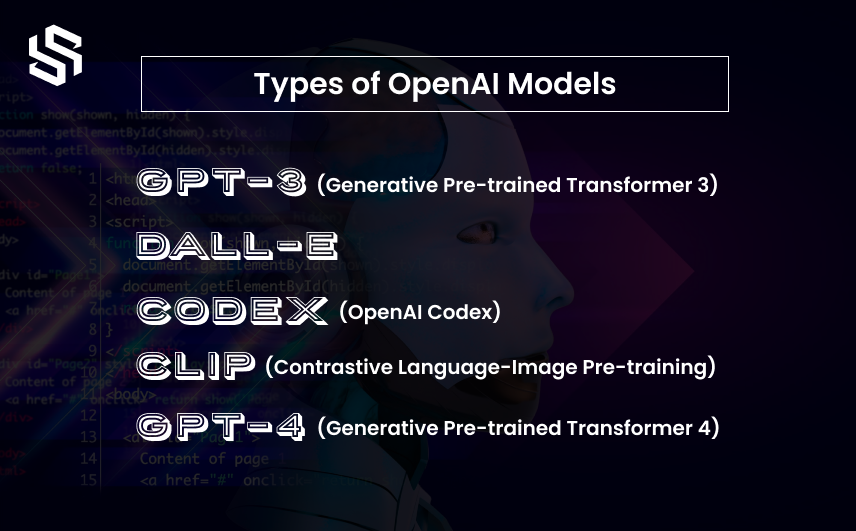
5 Types of OpenAI Models
/figure>
OpenAI offers several pre-trained models through its API for various applications, including text generation, question answering, and sentiment analysis.
Here are some key models:
1. GPT-3 (Generative Pre-trained Transformer 3):
It is a powerful language model capable of generating coherent and context-aware text, translating languages, summarizing articles, and answering questions.
2. DALL-E:
It is a generative model designed for creating unique images from textual descriptions.
3. Codex (OpenAI Codex):
It is a machine learning model proficient in generating code snippets in multiple programming languages.
4. CLIP (Contrastive Language-Image Pre-training):
It is an efficient method of image representation learning from natural language supervision.
5. GPT-4 (Generative Pre-trained Transformer 4):
It is a powerful large language model (LLM) with generative AI capabilities developed by OpenAI.
How These OpenAI Models Help Improve Sales Forecasting for Your Web App
1. How can GPT-3 improve sales forecasting:
- Analyzes ERP system data to identify patterns and trends.
- Builds predictive models based on historical data.
- Processes and analyzes text data to identify key trends.
- Understands contextual information for improved forecast accuracy.
- Boost sales forecasting, leading to better decisions and increased competitiveness.
2. How can DALL-E improve sales forecasting:
- Conducts image analysis to classify objects, scenes, and attributes.
- Generates images based on textual product descriptions.
- Analyzes image data for trend identification and improved forecasting.
3. How can Codex improve sales forecasting:
- Automates manual tasks in the ERP system, improving efficiency.
- Builds predictive models using historical ERP data.
- Analyzes ERP data to identify patterns and trends.
- Creates custom workflows to automate complex processes, enhancing efficiency.
4. How can CLIP improve sales forecasting:
- Understands the relationship between textual descriptions and images.
- Analyzes visual data for insights into product attributes.
- Provides a contextual understanding of images, improving sales context.
- Enhances sales forecasting with deeper insights from visual data.
5. How can GPT-4 improve sales forecasting:
- Offers advanced language understanding, improving data interpretation.
- Potentially processes both text and images for comprehensive analysis.
- Enhances predictive modeling with more accurate insights.
- Considers a broader range of contextual factors for precise forecasting.
Now that you understand the models and their integration with OpenAI, let’s start fine-tuning the model for ERP system integration.
Ways to Use OpenAI GPT – 3 and ChatGPT for Business Data Analysis
Step 4: Fine-tuning Model for Integrating into ERP System
Fine-tuning is essential for sales forecasting because the model needs optimization for the specific task. Sales forecasting involves predicting future sales based on historical data, which may differ from other data types and tasks the model was trained on.
The model’s parameters may need adjustments to accommodate these differences and optimize performance for sales forecasting.
Additionally, specific requirements, such as accuracy or timeliness, may need consideration during fine-tuning.
To start fine-tuning, developers can use the OpenAI CLI with commands like:
openai api fine_tunes.create -t -m BASE_MODEL
Here, BASE_MODEL is the base model’s name (e.g., ada, babbage, curie, or davinci). Our Dedicated ReactJS Developers can customize the fine-tuned model’s name using the suffix parameter.
How Artificial Intelligence is Transforming the Future of Web Development
Step 5: OpenAI Model Integration to Improve Sales Forecasting
Once the model is fine-tuned, it can be seamlessly integrated into your ERP system to enhance functionality and performance.
Here are the key steps involved in this integration:
- Choose the appropriate machine learning model API based on factors like accuracy, scalability, and interpretability, tailored for sales forecasting.
- Integrate the model’s input data with your ERP system’s data. This can be done by directly accessing your ERP system’s database or using an API to retrieve data.
- Obtain an OpenAI API key for accessing the OpenAI API.
- Make API calls to the OpenAI API, passing prompts to the chosen OpenAI model, and receiving predictions in return.
The specific integration steps may vary based on your ERP system and the OpenAI API you are using.
Step 6: Testing and Deployment of the Integrated OpenAI into the ERP System
To ensure the correct integration and utilization of the OpenAI model within your ERP system, a thorough testing phase is crucial. The QA team conducts tests to verify that the model’s predictions are correctly integrated into the ERP system. This involves comparing the model’s forecasts with actual sales data and assessing prediction accuracy.
Comprehensive testing guarantees a reliable and user-friendly application. Throughout the testing process, a checklist helps track and address any bugs or issues promptly, ensuring a high-quality final product.
Once the ERP system passes testing, it is deployed on a server or cloud platform for access by users. After deployment, ongoing maintenance is essential to ensure continued functionality. The team addresses user-reported bugs or errors and updates the application to maintain compatibility with new devices and browsers.
Are You Looking to Hire ReactJS Developers for Your Business?
We have experienced React app developers who have developed app solutions using OpenAI.
What are the Benefits of Using OpenAI in ERP Systems?
1. Data Accuracy: AI in ERPs reduces human error, ensuring precise data handling.
2. Enhanced Forecasting: AI analyzes data patterns for more accurate predictions and better decisions.
3. Streamlined Operations: Automating tasks allows employees to focus on strategic goals.
4. Predictive Maintenance: AI prevents costly equipment downtime with predictive insights.
5. Customer Service: AI analyzes customer behavior for personalized service.
6. Real-time Insights: AI provides quick, real-time data insights for agile decision-making.
7. Cost-Efficiency: Identifies inefficiencies and cost-saving opportunities.
8. Greater Scalability: AI-powered ERPs easily adapt to business growth.
9. Advanced Security: AI enhances system security by detecting threats.
10. Supply Chain Management: AI optimizes supply chains and forecasts demand.
11. Automated Reporting: AI automates report generation, saving time and ensuring accuracy.
12. Increased Productivity: Automates routine tasks to boost overall productivity.
13. Risk Management: Predicts and mitigates potential risks.
14. Process Automation: AI streamlines various processes, improving efficiency.
15. Personalized User Experience: Analyzes user preferences for tailored experiences.
16. Financial Management: Provides valuable financial insights for informed decisions.
17. Employee Management: Assists with workforce planning and performance management.
18. Integration: Seamlessly integrates with other systems, enhancing data flow.
19. Real-time Inventory: Tracks inventory in real-time, preventing overstock and shortages.
20. Faster Decision Making: Rapid analysis enables real-time decision-making.
Let’s delve into your ERP system requirements and discover the advantages that ReactJS and OpenAI can bring to your business.
Consider hiring OpenAI developers to explore the potential benefits for your business.
Best Artificial Intelligence App Ideas using OpenAI
Technology Stack Used for an ERP System in React Web App
As a leading software development company, we employ specific technologies when building an ERP application integrated with OpenAI API.
Here’s an overview of the technology stack for an ERP system:
| Category | Technology |
|---|---|
| Front-End Framework | React |
| Back-End Framework | Node.js |
| Database | PostgreSQL, MySQL, MongoDB (as needed) |
| Programming Languages | JavaScript (for both front-end and back-end) |
| AI and NLP Libraries | OpenAI API |
| API Integration | Axios, Fetch, or other libraries |
| Authentication and Security | Authentication and Security |
| Cloud Platform | AWS, Azure, Google Cloud |
| Version Control | Git |
| Development Tools | Visual Studio Code / JetBrains WebStorm, React-specific extensions |
| Testing Frameworks | Jest, React Testing Library |
| State Management (Optional) | Redux / React Context (as needed) |
| Front-End Styling | Bootstrap / Material-UI / Custom CSS |
| Monitoring and Logging | APM Tools (e.g., New Relic, Datadog), Logging Framework |
| CI/CD Pipeline | Automated CI/CD pipeline |
| Testing Frameworks | Jest, React Testing Library |
| Documentation and Collaboration | Swagger, Postman (API documentation), Communication and Collaboration Tools (e.g., Slack, Microsoft Teams) |
| Project Management Tools | Jira, Trello, Asana (as needed) |
/figure>
This technology stack ensures a robust and efficient ERP system with seamless OpenAI integration.
/figure>
How much does it cost to integrate OpenAI into an ERP system?
/figure>
The cost of integrating OpenAI into a web app to improve the ERP system can vary significantly based on several factors, including geographical location, project complexity, and the specific OpenAI models and features you plan to implement.
Here, we’ll provide approximate cost ranges for integrating OpenAI into an ERP system in different regions:
| Region | Integration Cost |
|---|---|
| United States | $50,000 to $250,000+ |
| United Kingdom | £40,000 to £200,000+ |
| Australia | $40,000 to $200,000+ |
| Canada | $50,000 to $250,000+ |
| United Arab Emirates (UAE) | AED 185,000 to AED 925,000+ |
| Nigeria | ₦8,000,000 to ₦40,000,000+ |
| India | ₹7,50,000 to ₹37,50,000+ |
/figure>
These cost estimates are approximate and can vary significantly based on several factors:
Project Complexity:
The complexity of your ERP system, the extent of OpenAI integration, and the number of features you wish to implement will impact the cost.
Developer Rates:
The hourly rates of developers in each region can differ. More experienced developers may charge higher rates.
Customization:
If you require extensive customization or unique features, it may increase the cost.
Licensing:
Depending on your usage, there may be licensing fees associated with using OpenAI’s models.
Maintenance and Support:
Consider ongoing maintenance and support costs after integration.
To get an accurate cost estimate for your specific ERP system and OpenAI integration project, it’s advisable to consult with development firms or experts in your region. They can assess your project’s requirements and provide a detailed cost proposal tailored to your needs.
Calculating the Total Cost:
To estimate the total cost, you can use the following formula:
Total Cost = (Developer Rate per Hour x Hours Spent) + OpenAI API Costs + Testing and QA Costs + Maintenance Costs + Miscellaneous Costs
NOTE: Keep in mind that this is a simplified estimate, and actual costs can vary widely based on specific project details and requirements. It’s advisable to consult with our development experts and OpenAI directly to get a more accurate cost assessment tailored to your ERP system integration project.
Partner with a top ReactJS development company to enhance your ERP system with AI capabilities.
Get Started with ReactJS Integration
Ways Custom AI-Powered Search Can Boost Your Business Efficiency
Syndell Can help you integrate OpenAI into your ERP(Enterprise Resource Planning) system
In this blog, you’ve acquired in-depth insights into integrating OpenAI into your ERP system. We’ve covered integration steps, data preparation, model selection, various types of OpenAI models, fine-tuning, integration into your ERP system, testing, deployment, benefits, technology stack, and frequently asked questions. Consider hiring OpenAI developers to facilitate the implementation of these insights into your ERP system
Are you interested in harnessing the power of OpenAI in your ERP system for your business? We are a leading ReactJS Development Services provider in the USA, UK, CA, and India with 9+ years of experience. You can Hire dedicated ReactJS developers who specialize in creating custom AI mobile applications tailored to your requirements.
Let’s connect with us and explore how OpenAI can transform your ERP system and grow your business.
What is an ERP system and why is it important for businesses?
What is OpenAI, and how can it improve ERP sales forecasting?
What data should I provide to OpenAI for sales forecasting?
Is it possible to automate sales reports using OpenAI in my React app?
How long does it take to integrate OpenAI into an ERP system?